Meet someone new
Greetings, polite phrases, and the first few words about yourself.

ENGLISH / A LITTLE MORE FREEDOM
Practice English with Start Speaking for travel, work, and new connections. Listen, speak, see your result — a few minutes on your iPhone.
SEE HOW IT WORKS
One useful phrase. Your own attempt. A clear next step.
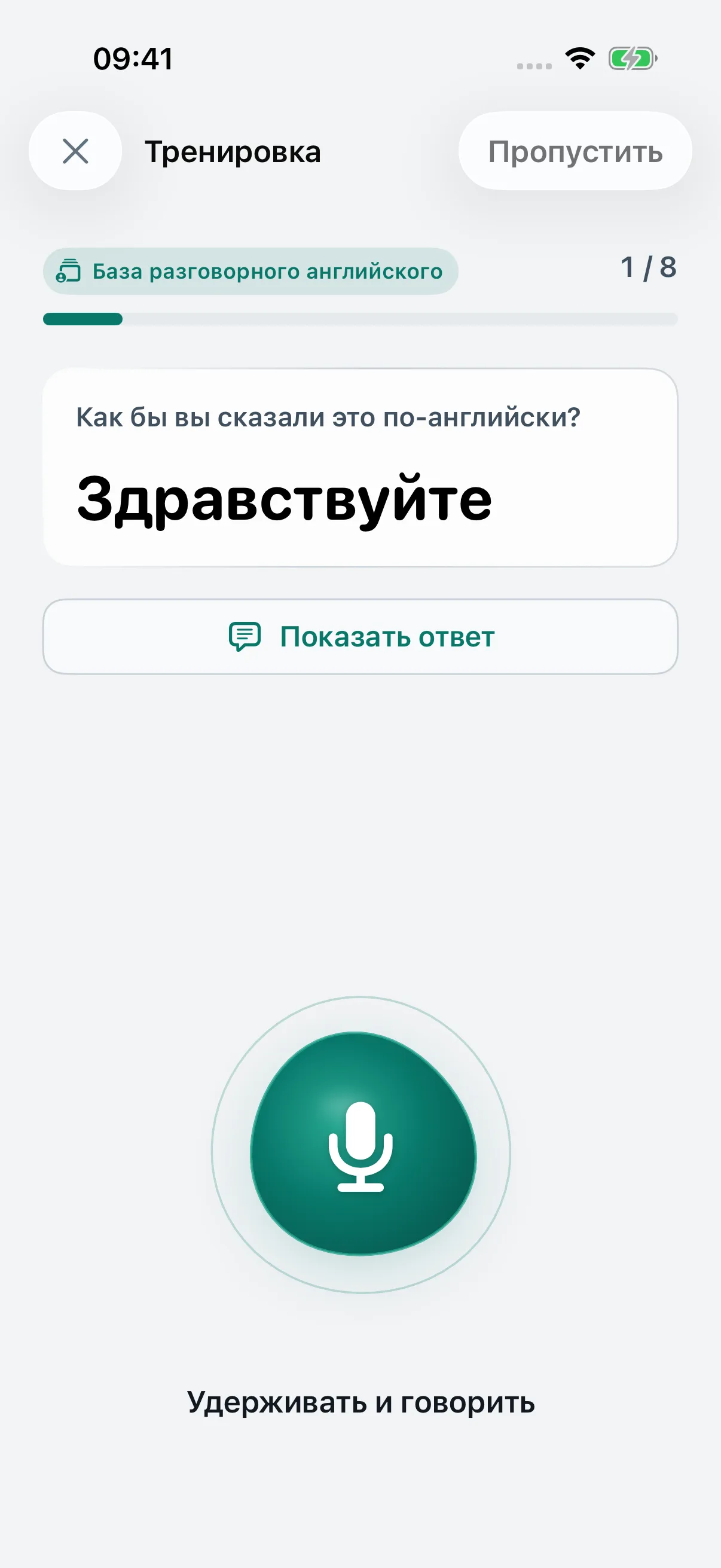
Read the situation. Listen to the model, then hold the microphone and speak.
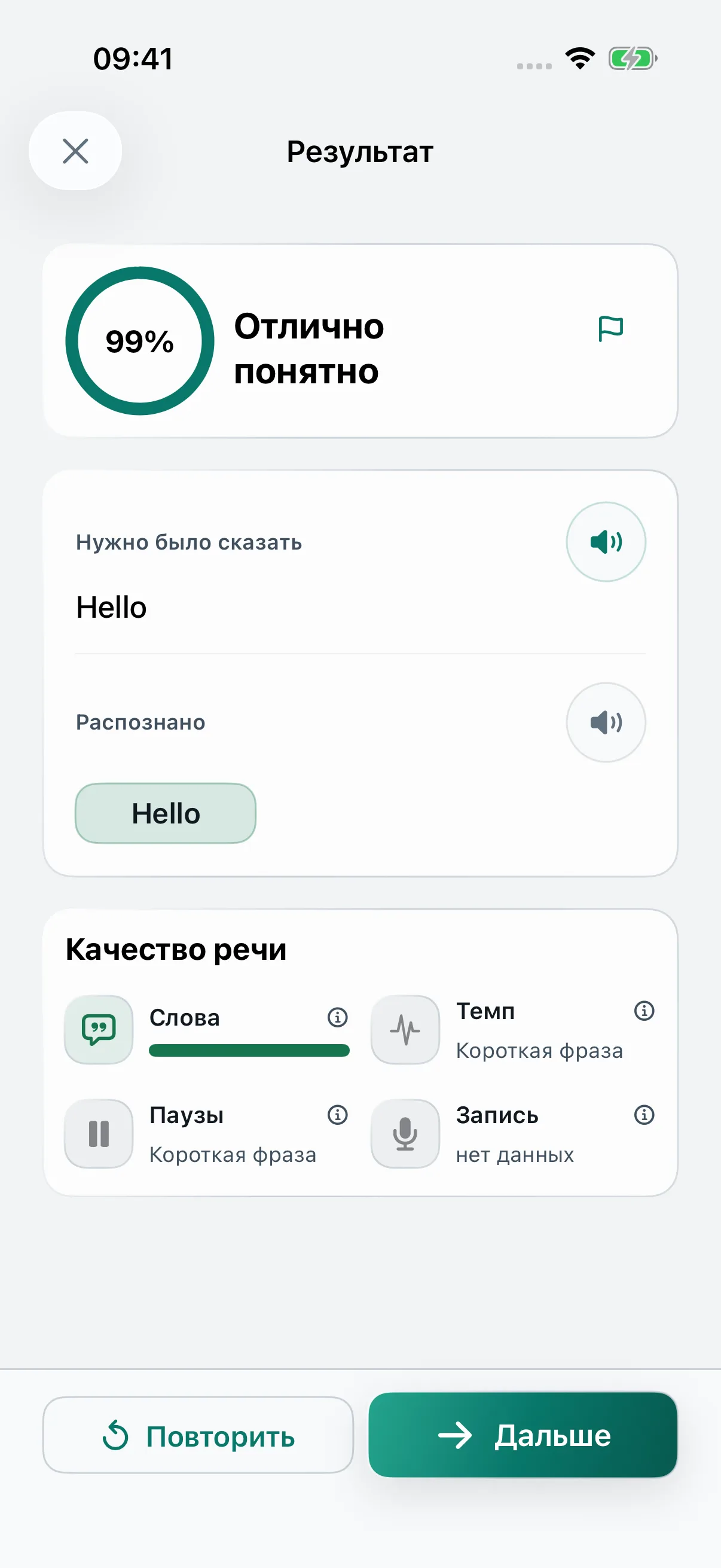
Compare the recognized words with the model. Choose what to focus on in your next attempt.
Try the phrase again while it is fresh. Come back to it in a later session.
Start a session. Read the phrase. Hold the microphone and speak your answer. Release to compare the recognized words with the model. Choose Retry for another attempt.
Watch the video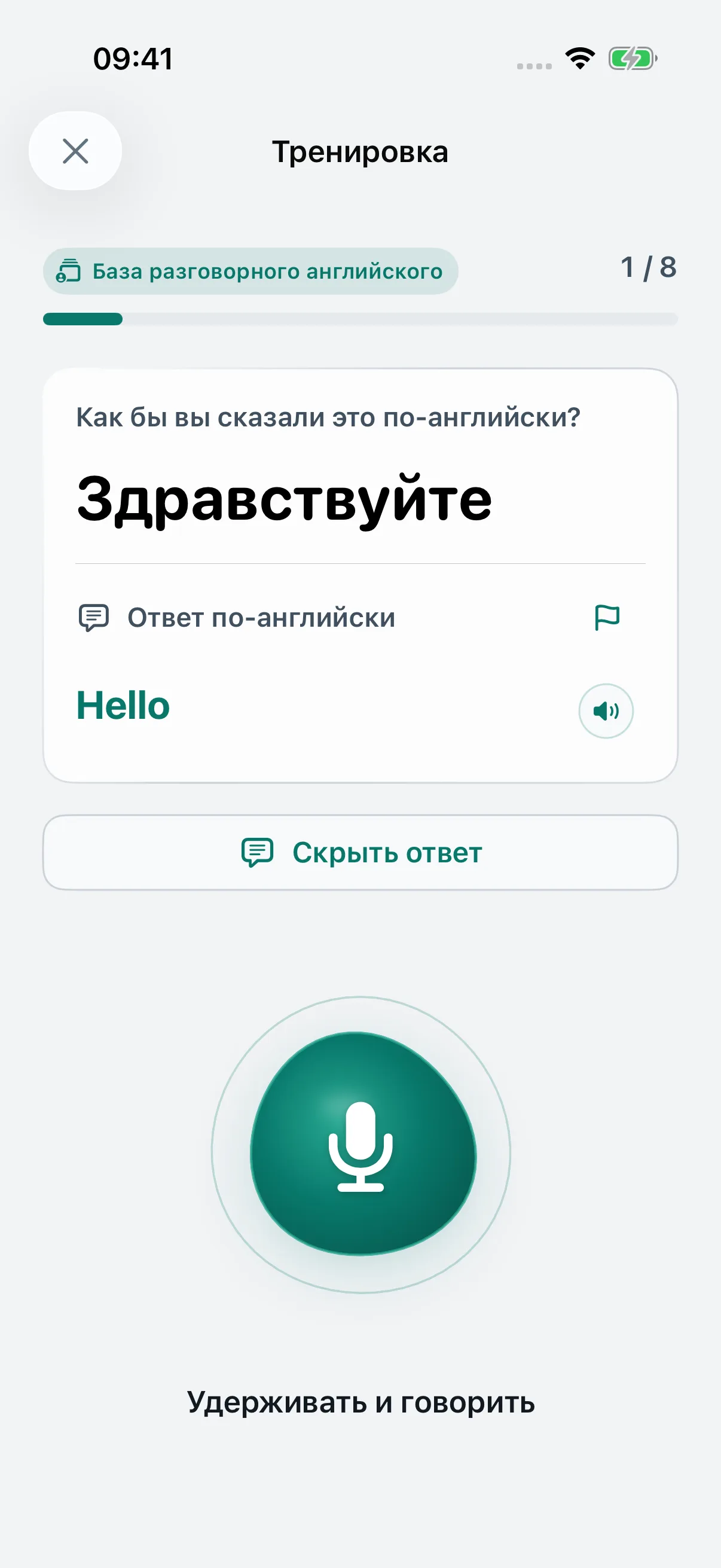
English course · Russian learner interface
Practice American English with Russian or Brazilian Portuguese learner support. Included practice materials are available without a purchase. Listen to a phrase, make your own attempt, and retry the part you want to improve.
Greetings, polite phrases, and the first few words about yourself.
Start with simple questions and short everyday phrases.
Start with everyday work phrases: introducing yourself, asking a question, or checking an arrangement.
LEARNING SCIENCE / MADE PRACTICAL
Memory, repetition, and speaking practice in one clear rhythm. Start Speaking turns learning principles into something you can do: say it, work on it, recall it again.
Listen to the model and make your own attempt. Put useful phrases into your own voice from your very first session.
Compare your words with the model, listen to your attempt, and try again. Every practice session gives you something concrete to work on.
Come back to familiar phrases and try saying them from memory. Review practice gives you another chance to find the words for yourself.
13 papers on speaking, memory and regular practice. Here is what researchers found, how we use the principles and where each study’s conclusions stop.
Finding. Repeated speaking tasks improved accuracy and syntactic complexity, with smaller gains in fluency and lexical complexity.
How we use it. The cycle of speaking, checking feedback and trying again gives each phrase a practical focus.
Scope of the evidence. A successful immediate retry does not establish lasting recall.
Original paper ↗Task repetition and L2 oral performance: A meta-analysisFinding. Spoken quizzes produced larger gains in spoken vocabulary, without a disadvantage in written vocabulary.
How we use it. We distinguish spoken and typed answers, so one response format does not stand in for practice in the other.
Scope of the evidence. The study tested heard words and translations, not phrase production with speech recognition.
Original paper ↗How Does the Test Modality of Weekly Quizzes Influence Learning the Spoken Forms of Second Language Vocabulary?Finding. Quizzes covering old and new words improved final results. The advantage depended on practice and was stronger for less proficient learners.
How we use it. Review brings previously studied material back instead of leaving it only in completed sessions.
Scope of the evidence. The study supports cumulative review, but does not specify the right proportion of old material for our app.
Original paper ↗Cumulative Testing for L2 Vocabulary Learning: The Impact of Retrieval Practice and ProficiencyFinding. Cumulative quizzes improved recall of meanings from spoken words. Spoken-mode practice was more strongly associated with the outcome than written practice.
How we use it. We revisit familiar material and keep listening part of speaking practice.
Scope of the evidence. These findings concern spoken vocabulary comprehension; they do not show that speaking in Start Speaking is twice as effective.
Original paper ↗Cumulative Testing for Learning Spoken VocabularyFinding. Spacing classroom practice generally helped retention more than massed practice. Results varied with conditions and the delay before testing.
How we use it. We make room to revisit material in later sessions.
Scope of the evidence. The review does not establish a universal interval or a three-repetitions-and-done rule.
Original paper ↗The Distributed Practice Effect on Classroom Learning: A Meta-Analytic Review of Applied ResearchFinding. Siri and Google Assistant transcription accuracy varied with speakers’ first languages. Human experts did not show that bias in the study’s comparison.
How we use it. We account for recognition uncertainty: a text mismatch is not always a learner error.
Scope of the evidence. This did not test our system or Russian speakers learning Brazilian Portuguese.
Original paper ↗Investigating Accent Bias in AI Intelligibility of L2 English AccentsFinding. A meta-analysis of 15 studies found benefits from speech-recognition practice. Explicit corrective feedback was associated with stronger effects than transcription alone.
How we use it. We show the model, recognized words and differences, with a chance to correct and retry.
Scope of the evidence. This does not validate precise phonetic diagnosis by our app or guarantee progress within a fixed time.
Original paper ↗The effectiveness of automatic speech recognition in ESL/EFL pronunciation: A meta-analysisFinding. Habit-formation times varied widely. Four studies reported timing; reported medians were 59–66 days.
How we use it. A manageable daily goal and reminders at a chosen time support returning to practice.
Scope of the evidence. The review concerns health behaviour. Its relevance to language learning is indirect, and it gives no deadline for forming a language habit.
Original paper ↗Time to Form a Habit: A Systematic Review and Meta-Analysis of Health Behaviour Habit Formation and Its DeterminantsFinding. A review of 41 digital physical-activity studies identified self-monitoring, goals and reminders as commonly used techniques.
How we use it. Visible sessions, progress, daily goals and adjustable reminders help organize practice.
Scope of the evidence. Frequent use of a technique does not prove it works. The review does not establish better vocabulary retention.
Original paper ↗Digital Behavior Change Intervention Designs for Habit Formation: Systematic ReviewFinding. Among 107 low-achieving adolescents, initial blocked practice helped learning. Moving from blocks to mixed practice produced more robust retention.
How we use it. We approach mixing gradually; the Portuguese verb trainer offers practice by form or in mixed order.
Scope of the evidence. Implementation is partial. We have no scientifically validated automatic transition threshold for adults or spoken Portuguese.
Original paper ↗Undesirable Difficulty of Interleaved Practice: The Importance of Initial Blocked Practice for Declarative Knowledge Development in Low-Achieving AdolescentsFinding. Retrieving studied material improved retention. Recall tests produced larger benefits than recognition tests in the meta-analysis.
How we use it. An independent answer is central to practice; recognizing a familiar word is different from recalling it.
Scope of the evidence. This is a general learning foundation, not a test of Portuguese speaking in Start Speaking.
Original paper ↗The effect of testing versus restudy on retention: A meta-analytic review of the testing effectFinding. Practice testing generally benefited learning more than restudying. Effects depended on test design and study conditions.
How we use it. Short attempts to recall are part of practice, rather than reserved for a final exam.
Scope of the evidence. A particular app’s effectiveness and ideal session length require separate evaluation.
Original paper ↗Rethinking the Use of Tests: A Meta-Analysis of Practice TestingFinding. Across 48 experiments with 3,411 participants, spaced practice helped second-language learning. Equal and expanding intervals were statistically comparable.
How we use it. Review over time informs the learning route.
Scope of the evidence. Our schedule is a design choice. The paper does not establish 1–3–7–14–30 days as the optimal sequence.
Original paper ↗The Effects of Spaced Practice on Second Language Learning: A Meta-AnalysisThese studies inform our learning principles; they are not trials of Start Speaking. Exact review intervals, rules for confirming learning and handling uncertain recognition are our design decisions and need evaluation with the app’s users.
READY BEFORE YOU GO
Set up On this iPhone during first-time setup or later in Settings inside Start Speaking. The guide covers both options: what to tap, how to confirm readiness and how to test a session offline.
Two ways to set up offline practiceFAQ
Yes. Start with greetings and short conversations, then explore situations for travel, work, and everyday life. Prompts are available with Russian or Brazilian Portuguese support.
American English, with useful phrases for meeting people, traveling, working, and everyday conversations.
Yes. Prepare speech recognition while you still have internet access. On this iPhone requires iOS 26 or later, a compatible iPhone and an Apple model for your selected language. Choose either setup method below.
If you see Couldn’t prepare, check your connection and retry in Recognition. If On this iPhone is missing or unavailable, check your iOS version; the app also checks device and language support. You can use text mode while the model is unavailable. Repeat setup and the offline check when switching your practice language.
How to download a higher-quality voice for example phrases
In the Russian app interface: Настройки → Речь → Распознавание → На этом iPhone. Wait for Готово and the checkmark. The first-time setup screen is Хотите заниматься без интернета?; tap Скачать и включить or Включить.
Introductions, cafés and restaurants, shops, transport, everyday work conversations, appointments, hotels, and airports. Rehearse phrases you will use in your next conversation.
Start with the included practice materials — no purchase, ads, or account needed.
See your recognized words beside the model, listen to your recording, and try again. You have a clear focus for your next attempt. History stays on your device; recordings are temporary for replay during the session. Anonymous analytics can be turned off in Settings.
A higher-quality voice changes how the app reads example phrases. First download a voice in iPhone Settings, then choose it inside Start Speaking. This is separate from speech recognition: the recognition model handles your spoken answer; the voice reads the examples.
On your phone, outside Start Speaking
If your iPhone menus are in Russian: Настройки → Универсальный доступ → Чтение вслух → Голоса; older versions use Устный контент. You do not need to turn on VoiceOver or Speak Screen to use the voice in Start Speaking.
Now return to the app
You can also start from the app: in the voice picker, tap Open Settings route. iOS may leave you in the previously open settings section. If so, return to the main iPhone Settings screen and follow step 1.
In the Russian app interface: Настройки → Речь → Озвучка фраз → Проверить снова. Voice quality is labelled Улучшенная версия or Премиум-версия.
For travel, test playback in Airplane Mode with Wi-Fi off after downloading. Offline recognition of your own speech needs a separate setup. Set up offline speech recognition
You can check the system menu names in Apple’s iPhone guide.
GET STARTED
Download Start Speaking from the App Store on your iPhone and choose your practice language.
Visit the Start Speaking: HabiFala listing.
Use the download button, then open the installed app.
Start with your first useful phrase.
No ads. No account. Included practice materials need no purchase — you can start practicing straight away.
THE NEXT CONVERSATION IS YOURS
Practice today. Take your next phrase into the world.
DownloadThe Android version is not available yet. Email signup for a launch notice is not open yet.